Email:

tekale.durgesh5@gmail.com

Email:

tekale.durgesh5@gmail.com

B2B Leadfinder 2.0

The goal was to design a unified prospecting experience that eliminates the broken workflow between finding leads and sending outreach — bringing 800M+ verified B2B contacts, account-based prospecting, and smart list management directly inside SalesHandy, with zero need for external tools.

I'm passionate about removing friction from complex sales workflows through purposeful UI decisions. My mission is to turn multi-tool chaos into one focused, intelligent prospecting experience.

Role

UI UX Designer

Category

B2B SaaS · Lead Generation

Company

Saleshandy

Portfolio project image

01

Context

The problem hiding in plain sight

Every outbound sales team using a B2B database was living with the same quiet frustrations. Credits that reset to zero each month whether used or not. Emails that bounced despite being "verified." Prospecting that happened in one tool, outreach that ran in another — and a manual, error-prone bridge between the two.

The product gap was deeper than just data quality. There was no way to start with a company and work down to the right people. You could search for individuals, but account-based prospecting — the way modern B2B sales actually works — simply didn't exist inside a cold email platform. Reps were stitching together five tools to do what should be one seamless flow.

02

Research

Listening before assuming

Research surfaced four distinct breakdowns that SDRs and agencies faced daily — each one becoming a direct feature requirement for Leadfinder 2.0.

Data coverage was too thin and unverified

Existing B2B databases had limited contact coverage and verified emails only at the point of import — not at the point of reveal. Bounce rates were high, and reps had no confidence in the data they were paying for. A multi-source, reveal-time verification model was the clearest path forward.

No account-based entry point existed

Every cold email platform allowed searching for people. None allowed starting with companies. But SDRs using ICP-driven strategies needed to identify target accounts first, then find the right contacts inside them. This workflow simply wasn't possible — until now.

Duplicate leads were costing agencies clients

Agencies running campaigns for multiple clients had no reliable way to prevent the same lead from appearing across different client lists. Without include/exclude list logic at the search level, overlap was inevitable and damaging to client relationships.

Credits disappeared whether used or not

Monthly credit resets penalised teams for running lean months. Reps rushed to use credits before the reset — pulling lower-quality leads just to avoid waste. A rollover model was the most requested fix across the user base.

03

Define

Sharpening the problem statement

How Might We

How might we give SalesHandy users a complete, account-first prospecting experience — with verified data, smart buying signals, and organised list management — so that finding a lead and reaching out to them happens in one place, without losing context at any step?

Two primary user profiles shaped the design: The SDR (individual contributor, people-first searches, needs high email accuracy and fast list-building) and The Agency Rep (manages multiple client campaigns simultaneously, needs airtight list separation and zero lead overlap). Both were failing the current product — for entirely different reasons.

04

Ideation

From five tools to one platform

The governing concept: Leadfinder 2.0 should not feel like a feature added to a cold email tool. It should feel like a prospecting platform that also happens to send your emails. Every design decision was filtered through that lens.

05

Design

Every pixel with a purpose

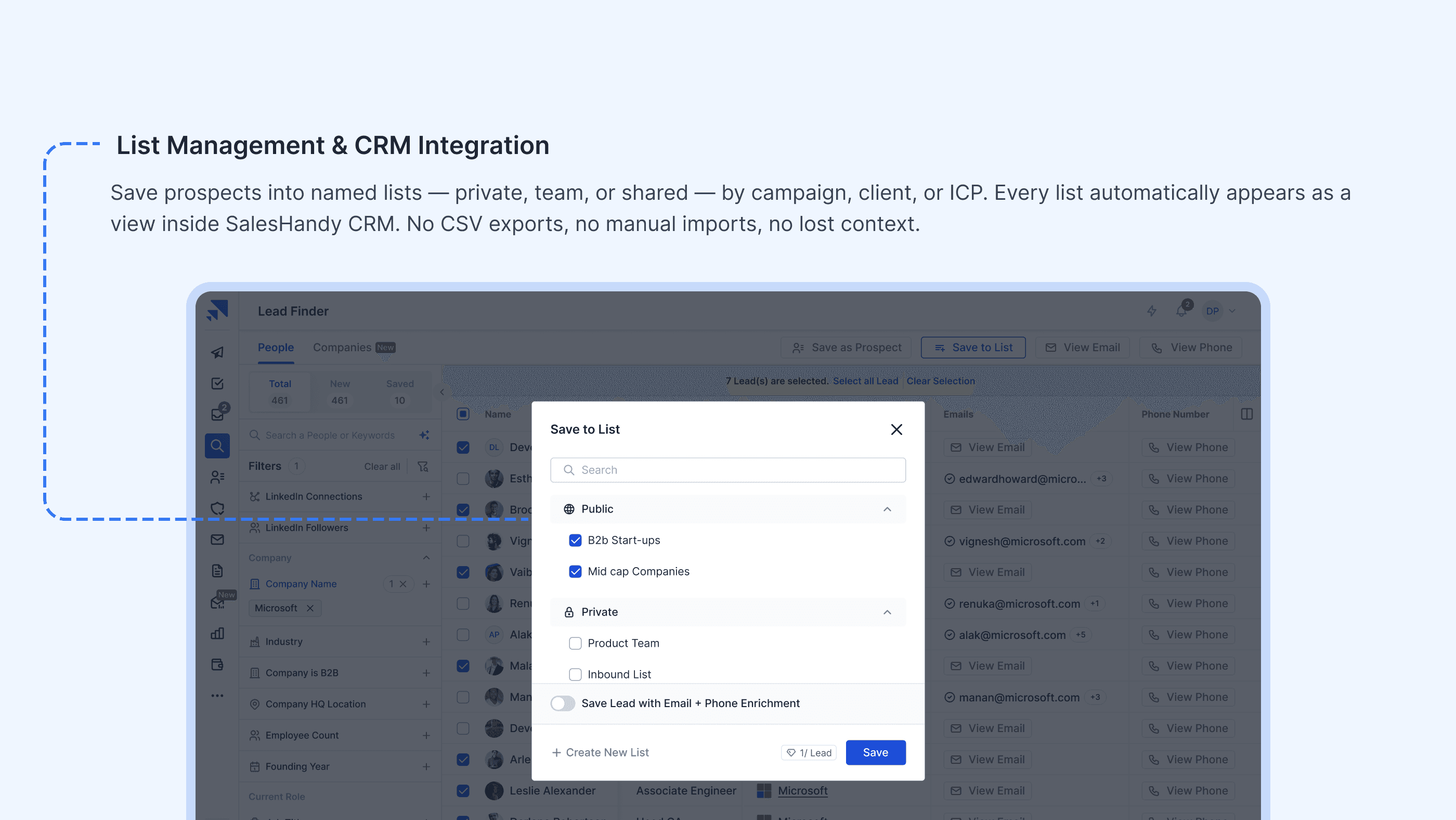
High-fidelity screens were built in Figma across the four core feature areas of Leadfinder 2.0. The design extended the existing SalesHandy design system with new components: a dual-tab search interface (People / Company), a buying signal filter panel, a list management sidebar, and an inline prospect reveal flow.

06

Outcome

Impact, measured

07

Learning

What I'd do differently

The most valuable early decision was treating the list system as infrastructure, not a feature. Getting the data model right — private lists, team lists, shared lists, and include/exclude logic — before touching the visual design meant every subsequent screen had a stable foundation to build on. Skipping that step would have caused expensive rework mid-project.

The hardest design call was buying signals. The instinct was to give them their own dedicated space — a signals dashboard felt like a natural home for eight distinct data points. The right answer was the opposite: signals as filters, embedded in the search context where reps were already making decisions. Less surface area, more utility.

"The best prospecting tool is the one you never have to leave. Every design decision came back to that." — Personal reflection

Let's create
something
extraordinary
together.

Let’s make an impact

Durgesh Tekale

UX Designer | Product Designer

Contact me

tekale.durgesh5@gmail.com

Hit me up if you’re looking for a fast, reliable web-designer who can bring your vision to life

Available for work

Let's create
something
extraordinary
together.

Let’s make an impact

Durgesh Tekale

UX Designer | Product Designer

Contact me

tekale.durgesh5@gmail.com

Hit me up if you’re looking for a fast, reliable web-designer who can bring your vision to life

Let's create
something
extraordinary
together.

Let’s make an impact

Durgesh Tekale

UX Designer | Product Designer

Contact me

tekale.durgesh5@gmail.com

Hit me up if you’re looking for a fast, reliable web-designer who can bring your vision to life

Create a free website with Framer, the website builder loved by startups, designers and agencies.